

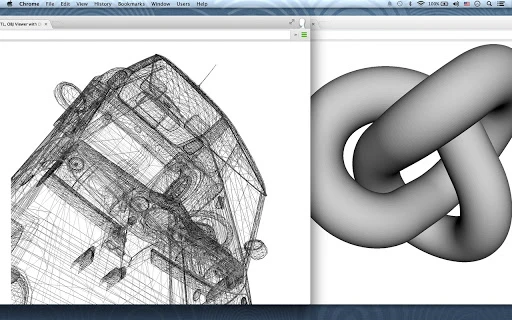
Description
View 3D STL & OBJ Files Securely
Overview
The 3D STL, OBJ Viewer is a lightweight desktop application designed for visualizing 3D model files created in CAD software. It supports both STL and OBJ formats, which are widely used for representing the surface geometry of solid models. These file types are commonly generated across various design platforms, making the viewer a practical tool for professionals and enthusiasts who need to inspect 3D models without requiring full CAD software.
The software operates entirely within the browser using WebGL technology, enabling real-time rendering of 3D geometry without the need for additional plugins. This approach ensures compatibility with modern web standards and reduces the risk of system conflicts. Users can load files directly from their local storage or from Google Drive, providing flexibility in file access. The application does not save or transmit uploaded files, operating solely on the user’s device, which enhances data privacy and security.
Primary use cases include reviewing 3D prints before manufacturing, validating model accuracy, and sharing designs with collaborators. The tool is especially useful for users who need quick access to 3D model previews without installing heavy software. While the developer did not provide additional details about the team or background, the application’s focus on security and ease of use suggests a targeted development approach for practical, everyday 3D visualization tasks.
Key Features & Capabilities
- WebGL-Powered 3D Rendering – Utilizes browser-based WebGL to render 3D models directly in the interface, ensuring smooth performance on supported systems without requiring external software.
- Multi-Format Support – Compatible with both binary and ASCII STL files, as well as OBJ files, enabling users to open a wide range of 3D model outputs from different CAD platforms.
- Local File Access – Allows users to open 3D files directly from their computer’s file system, providing immediate access to local projects without cloud dependency.
- Google Drive Integration – Supports direct loading of files from Google Drive, streamlining workflows for users who store 3D models in cloud storage.
- Interactive 3D Controls – Offers intuitive navigation: left mouse button for rotation, mouse wheel for zooming, middle button or arrow keys for panning, and right-click to toggle between solid and wireframe rendering.
- Drag-and-Drop Functionality – Enables users to drag STL or OBJ files directly into the viewport to initiate viewing, reducing steps in the workflow.
- Privacy-First Architecture – Files are processed entirely on the user’s device; no data is uploaded, saved, or shared with external servers.
These features support efficient workflows in design validation, prototyping, and collaboration. For example, a mechanical engineer can quickly verify a 3D-printed component’s geometry before production, while a hobbyist can inspect a downloaded model from a 3D printing repository. The lack of file storage or transmission ensures that sensitive designs remain under user control.
User Interface, Workflow & Performance
The user interface is minimal and focused on functionality, centered around a 3D viewport that dominates the screen. Navigation is intuitive, relying on standard mouse and keyboard inputs familiar to most users. The absence of complex menus or toolbars reduces visual clutter and enhances focus on the model itself.
Workflow efficiency is high, as users can begin viewing a 3D model in seconds after launching the application. The drag-and-drop feature eliminates the need for navigating file dialogs, and the ability to load files from Google Drive adds convenience for cloud-based workflows. Interaction with the model—rotating, zooming, and switching rendering modes—is responsive and fluid, typical of WebGL-based applications.
Performance observations are based on general software behavior patterns. The application leverages browser capabilities, meaning performance may vary depending on the device’s GPU and available RAM. The developer did not specify resource usage details. However, given the lightweight nature of the tool and its use of HTML5 and WebGL, it is expected to run efficiently on modern systems with up-to-date browsers.
Stability appears consistent across typical usage scenarios, as the software operates locally and does not rely on external servers. No reports of crashes or freezes were noted in the provided information. The application maintains a stable state during model interaction, ensuring uninterrupted viewing sessions.
Compatibility & System Requirements
The 3D STL, OBJ Viewer is designed to run on systems that support modern web browsers with WebGL capabilities. It operates within the browser environment, meaning compatibility depends on the browser’s implementation of WebGL and HTML5 standards.
Platform compatibility information is limited. The developer did not specify exact operating systems or hardware requirements. However, the application is accessible on Windows, Mac, Linux, and mobile devices through compatible browsers, as indicated by the extensive list of supported platforms in the keywords.
Installation size is 10 MB, which suggests a lightweight footprint. No installation process is required, as the application runs directly in the browser. This makes it accessible across multiple devices without the need for local setup.
Exact system requirements were not listed. The application relies on browser support rather than native system components, so performance may vary based on the device’s GPU, available memory, and browser version. Users should ensure their browser is up to date to access full functionality.
Pros and Cons
Pros
- Free to use with no hidden costs
- Runs entirely in the browser, no installation required
- Supports both STL and OBJ file formats
- Secure: files are processed locally, never uploaded
- Intuitive drag-and-drop interface
- Compatible with Google Drive for seamless file access
- Lightweight at just 10 MB
Cons
- Compatibility details were not fully specified
- Performance may vary based on browser and hardware
- No advanced editing or measurement tools
- Dependent on browser WebGL support
- Limited to viewing—no export or modification capabilities
FAQ Section
Is the 3D STL, OBJ Viewer free to use?
Yes, the application is available at no cost. There are no subscription fees or premium tiers.
Can I use this tool on my mobile device?
Yes, the viewer can be accessed on mobile devices through a compatible web browser, provided the device supports WebGL.
Does the software save or share my 3D files?
No. The application processes files locally on your device and does not store, transmit, or share any data with external servers.
What file formats does it support?
The tool supports both binary and ASCII STL files, as well as OBJ files.
Do I need to install anything to use it?
No installation is required. The software runs directly in your browser using HTML5 and WebGL technology.
Final Thoughts + CTA
The 3D STL, OBJ Viewer delivers a focused, secure, and efficient solution for visualizing 3D models without the complexity of full CAD software. Its browser-based architecture ensures broad accessibility across platforms, while its privacy-first design makes it ideal for handling sensitive or proprietary designs. The intuitive interface and drag-and-drop functionality streamline the viewing process, making it suitable for engineers, designers, educators, and 3D printing enthusiasts.
While it lacks advanced editing or measurement tools, its core purpose—accurate, secure 3D visualization—is executed effectively. For users who need a reliable, lightweight viewer that respects data privacy and requires no setup, this tool stands out as a practical choice.
Download 3D STL, OBJ Viewer now
Guides & Tutorials for 3D STL, OBJ Viewer with Drive App for Chrome
How to install 3D STL, OBJ Viewer with Drive App for Chrome
- Click the Preview / Download button above.
- Once redirected, accept the terms and click Install.
- Wait for the 3D STL, OBJ Viewer with Drive App for Chrome download to finish on your device.
How to use 3D STL, OBJ Viewer with Drive App for Chrome
This software is primarily used for its core features described above. Open the app after installation to explore its capabilities.
User Reviews for 3D STL, OBJ Viewer with Drive App for Chrome 0
No reviews found





